
AI Writer Check
Make an AI-assisted draft sound like you
A useful rewrite does more than swap words. It makes your meaning clearer and gives the reader something specific. Check a short draft free, then use the humanizer in the app to explore wording you can edit and own.
Start with what you want to say
Before rewriting, write down your main point in your own words. Decide who will read it and what they should understand next. An AI-assisted draft may have a neat structure while missing your actual argument. Keep the useful material and remove paragraphs that do not serve the reader.
Your voice comes from choices: what you notice, which examples you use and how strongly you state an opinion. Add details from your own work or experience without inventing them. Replace vague praise with a concrete observation, and separate verified facts from your interpretation.
Use the humanizer as an editing partner
The humanizer suggests a revised version of the text. Compare it with the original rather than accepting it automatically. Look for changes to names, numbers, caveats and cause-and-effect claims. A smoother sentence can still say the wrong thing. Keep the language that fits your tone and restore any nuance that was lost.
Vary sentence length when it improves rhythm, not simply to change a detector score. Use direct verbs, remove repeated transitions and read the result aloud. If you would not naturally say a phrase, rewrite it yourself. For shared team content, follow the agreed style rather than trying to imitate an invented personality.
Be transparent about assistance
Humanizing is not a guarantee that a detector will classify a text as human. Detection can produce false positives and miss AI-assisted writing. A changed score does not prove originality, factual accuracy or compliance with a course policy. Use the check to inform editing, not to hide assistance where disclosure is required.
Before sharing, verify sources, get permission for personal details and follow your school or workplace rules. In the app, one humanization uses two credits and one analysis uses one credit. You can start with the login-free short check to see the workflow, then choose a one-time credit pack if you need more. No subscription is required.
Review every rewrite for meaning and responsibility
Identify what feels unlike you before rewriting. Perhaps the introduction delays the point, examples could apply to any industry or every paragraph ends with the same summary. Write a note about the change you want. It makes the suggestion easier to judge. Your goal might be a direct opening, clearer explanation or warmer tone. None requires pretending an assistant was not involved. Judge the suggestion against your purpose, not against a promise of passing a detector.
Compare small sections with the original. Check who acts in each sentence, how strongly a claim is stated and which qualifications remain. May, can and will are not interchangeable. Turning a possibility into a certainty changes meaning even when the wording sounds smoother. Restore caveats, verify references and remove new examples you cannot substantiate. Keep an untouched original while reviewing. If a term has a specific legal or technical meaning, do not accept an easier synonym without checking it.
Add voice through real choices, not invented anecdotes. Explain why an issue matters, describe an observation from your work or label an opinion as opinion. Vary sentence length where the argument benefits from a pause. Keep necessary technical vocabulary and explain it when needed. Deliberately adding mistakes is no substitute for clear writing. For team documents, follow the agreed style and ensure colleagues can review meaningful changes. You do not need to manufacture an informal personality to make prose useful.
Before sharing, review rules on assistance. If a teacher or client requested independent writing, do not use rewriting to conceal generated work. If help is permitted, understand and endorse the final text. A final check may reveal generic wording but cannot guarantee another tool’s result. Export after reviewing the complete document, including names, numbers and references. The valuable outcome is useful writing reflecting your judgement, not an undetectability promise. Keep disclosure where required and take responsibility for the words you publish.
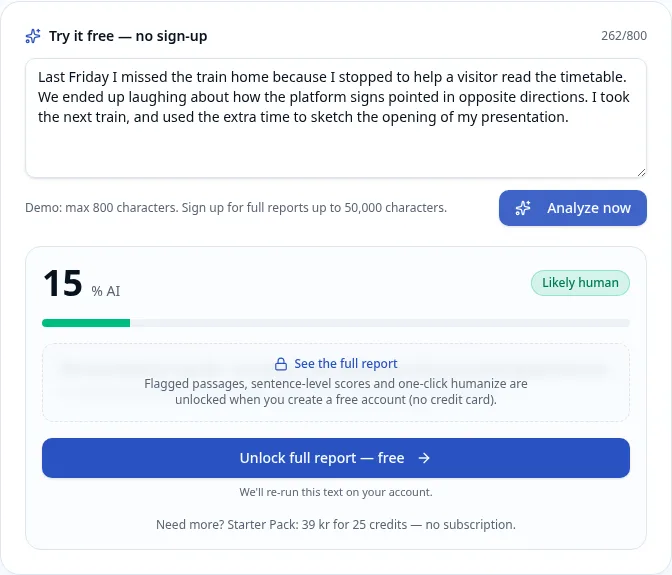
A real short-check result. This example is not an accuracy test.